AI CAM today: copilots speed up programming
CloudNC, Siemens NX AI-MMS and Autodesk-backed Toolpath have pushed the manufacturing copilot into the spotlight. We set out which part of CNC programming AI CAM automates, what each vendor does, and why zero-touch is still out of reach.
In this article
In 2026 the "manufacturing copilot" became a buzzword in industrial software. Autodesk invested 50 million dollars in the AI CAM platform Toolpath; CloudNC's CAM Assist 2.0 reached more than a thousand shops; and Siemens folded CAM Assist into NX while launching its own AI Make Machining Suggestion. Following the previous article on simulation surrogate models, this one turns to the manufacturing side: which part of CNC programming AI CAM actually automates, what each vendor does, and why "zero-touch" is still out of reach. Sources were checked as of October 30, 2026; the performance figures and investment amounts are vendor or press statements and have not been tested by CADFrontier.
1. Which part of CNC programming AI CAM automates
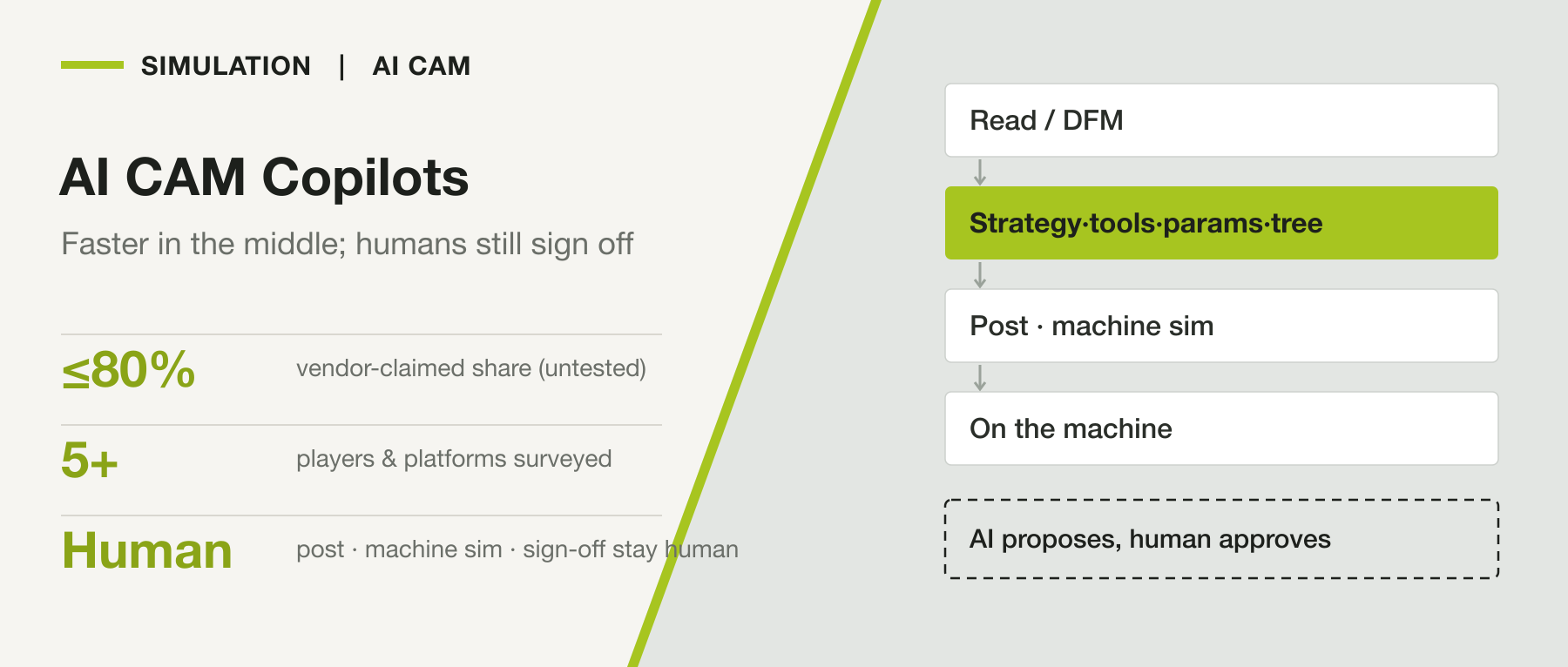
A typical CNC programming chain runs: read the drawing and run design-for-manufacturing (DFM) analysis → decide the machining strategy → select tools → set feeds and speeds → build the operations tree → post-process into G-code → simulate on the machine → run the job. AI mainly targets the middle steps — strategy, tooling, cutting parameters and the operations tree — especially prismatic parts and 3-axis and 3+2-axis work. It turns programming from "building from scratch" into "review and approve."
By form there are three kinds: automatic strategy and toolpath generation (CloudNC, Siemens AI-MMS, Toolpath); conversational copilots (Fusion's Assistant, NX Copilot, Mastercam Copilot); and a quoting and DFM front end (Toolpath).
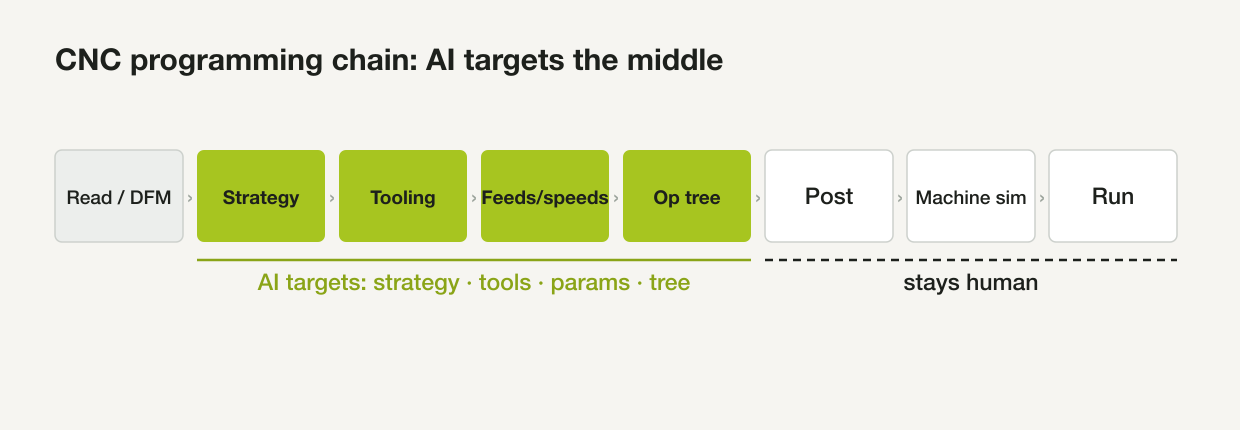
Figure 1: AI today automates the middle of the chain (strategy, tooling, parameters, operations tree); post-processing, machine simulation and running the job stay with people. Drawn by CADFrontier.
2. What each vendor is doing
The following are vendors' public statements, untested.
- CloudNC CAM Assist: being cross-platform is its distinguishing trait — it works in Autodesk Fusion, Mastercam, Siemens NX, GibbsCAM and SolidCAM, with Creo coming soon. Behind it is reinforcement learning the company says was trained on billions of machining scenarios. With one click it analyzes the part and setups, selects tools and strategies and builds a complete operations tree, claiming it "completes up to 80% of your CAM program in minutes," after which a person simulates and posts. Version 2.0 adds step-by-step review and is said to be in more than a thousand shops.
- Siemens NX AI-MMS (AI Make Machining Suggestion): in NX X Manufacturing, it uses large language models together with your own historical data: select a face and it returns three complete suggestions (operations, tools, cutting parameters), aimed at prismatic features and 2.5/3-axis work. The 2606 release adds a "history-free" generative option and can create a parametric tool automatically when one is missing. There is also a conversational NX Copilot for navigation and questions. Siemens frames its approach more conservatively, emphasizing rule-based templates and data reuse.
- Autodesk Fusion: the Assistant in the Manufacturing workspace can create setups and toolpaths, select tools and rename operations through natural language. Fusion has also become the preferred launch platform for AI CAM start-ups — CloudNC, Toolpath and LimitlessCNC all integrate with Fusion first.
- Toolpath: it uses AI for manufacturability analysis, quoting, cycle-time estimation, and tooling and fixture recommendations, then feeds Fusion to generate editable 3-axis and 3+2-axis toolpaths. Autodesk invested 50 million dollars in it; the company says it cuts programming time by 70–80% and stresses that it is a "co-pilot," not an "autopilot." Its quoting workflow is more mature than its CAM integration.
- Mastercam Copilot, SolidCAM's chat assistant, LimitlessCNC, Productive Machines and OPEN MIND are also working along this line.
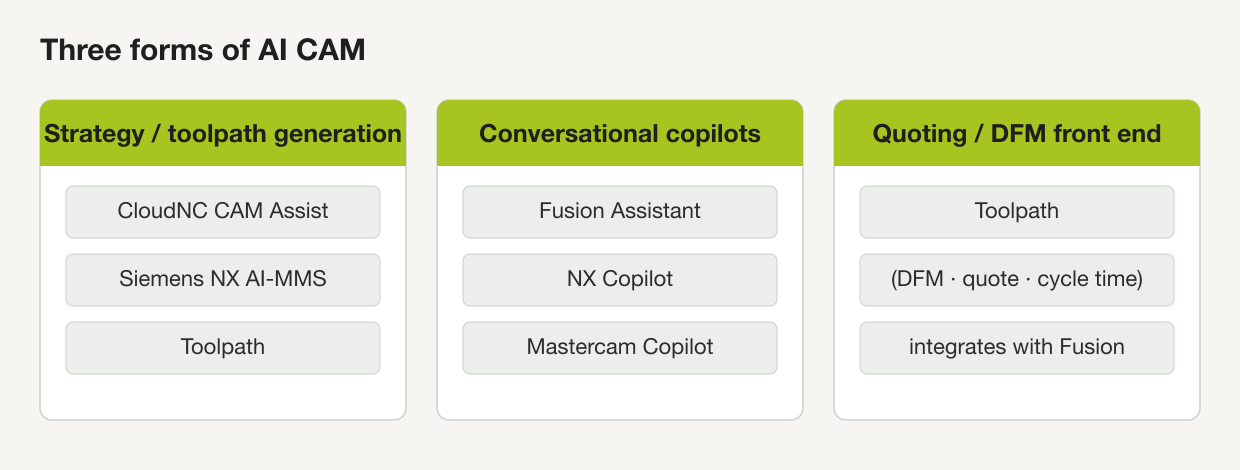
Figure 2: The three current forms of AI CAM. Drawn by CADFrontier.
3. Where it fits on the shop floor
The most mature use today is fast first-pass programming of prismatic parts in regular 3-axis and 3+2-axis work, plus the quoting and DFM front end — freeing programmers from repetitive setup so they can do more parts. It has prerequisites: a well-organized tool library, machine and post-processor configuration, and usable historical machining data. Without these, AI cannot produce a workable plan.
4. Why "zero-touch" is still out of reach
This is the section the shop should watch most closely.
The consensus is "AI proposes, humans approve": AI-generated toolpaths and parameters still go through machine simulation, verification and human sign-off, especially for safety-critical, compliance-bound or high-value parts. Some steps still need human judgment: collision avoidance on complex 5-axis geometry, fixture design, chip control in exotic materials, chatter and tool deflection, and first-article process qualification.
Post-processing is the most underweighted step: machine-ready G-code must match the specific machine, controller, post-processor, setup, tooling, stock, work offset, material and tolerance requirements — a mismatch anywhere can cause trouble. There is also a reality gap: some users report that AI CAM is "no faster than well-made templates" and "has no awareness of tolerances," and that it can produce output that "looks right but is wrong." A safer deployment uses guardrails — letting AI operate within ranges a process owner defines (maximum chip load, cutting force, spindle power, temperature). As for "completes 80%" and "cuts time by 70–80%," these are vendor figures with no independent verification yet.
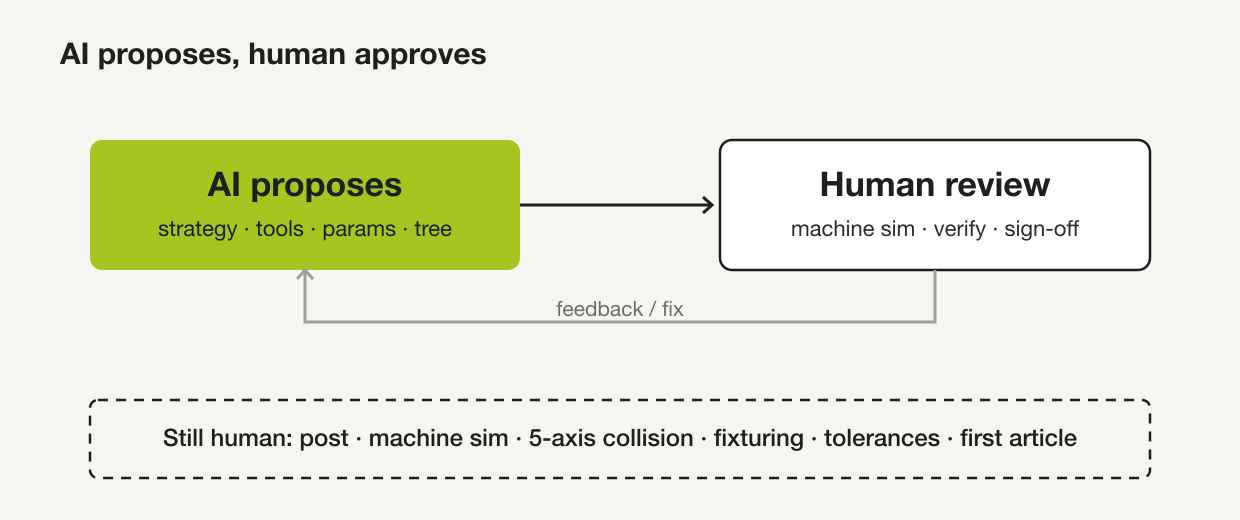
Figure 3: AI CAM today is a loop of "AI proposes → human reviews and signs off"; post-processing, machine simulation, 5-axis collision avoidance, fixturing, tolerances and first-article checks stay with people. Drawn by CADFrontier.
5. My view
As this article's title puts it, what AI CAM really delivers today is a copilot that speeds up programming — automating the repetitive building of strategy, tooling, parameters and the operations tree, moving programmers from "building from scratch" to "review and approve." That is a real efficiency gain, but it is not yet autonomous programming.
Looking ahead, every vendor's roadmap points toward more automation: Siemens has written AI-MMS's goal as moving from "select a face for suggestions" to "single-run, full-part programming," while CloudNC and Toolpath are joining "quote → program → simulate" into a closed loop; as models and historical data accumulate, first-pass coverage and the range of parts will keep growing. But I think the real bottleneck has never been only "can it generate a toolpath" — it is "can it match the specific machine and process, and can it be trusted to release." The last stretch — post-processing, machine simulation, 5-axis collision avoidance, tolerances and first-article sign-off — stays with people for now. Whoever first makes trustworthy post-processing and auditable verification solid is the one who can move from "copilot" toward "more autonomous." For the shop, the realistic path is to use it first for first-pass programming and quoting of prismatic parts, while getting the tool library, post-processor and historical data in order — which is both the prerequisite for using today's AI CAM well and the foundation for the more autonomous versions to come.
This article is an editorial analysis based on public material; the performance and funding figures are vendor or press statements and have not been independently verified. The illustrations are conceptual diagrams drawn by CADFrontier.
Sources & further reading
- CloudNC: What is a CAM copilot (CAM Assist capability and cross-platform) ↗Source region: United Kingdom
- MachineToolNews: CloudNC CAM Assist 2.0 in 1,000+ shops ↗Source region: International
- Siemens NX Manufacturing blog: AI Make Machining Suggestion in NX 2512 ↗Source region: International
- Engineering.com: AI Make Machining Suggestion now in Siemens NX X Manufacturing ↗Source region: International
- Autodesk Fusion blog: CloudNC CAM Assist add-in for Fusion ↗Source region: United States
- Toolpath: AI-powered quoting and CAM automation ↗Source region: United States
- Report: Autodesk invests USD 50M in AI CAM platform Toolpath ↗Source region: International
- Vericut: Will AI replace CNC programmers (limits and human oversight) ↗Source region: International
- Dassault DELMIA blog: AI-assisted CAM without losing manufacturing control ↗Source region: International