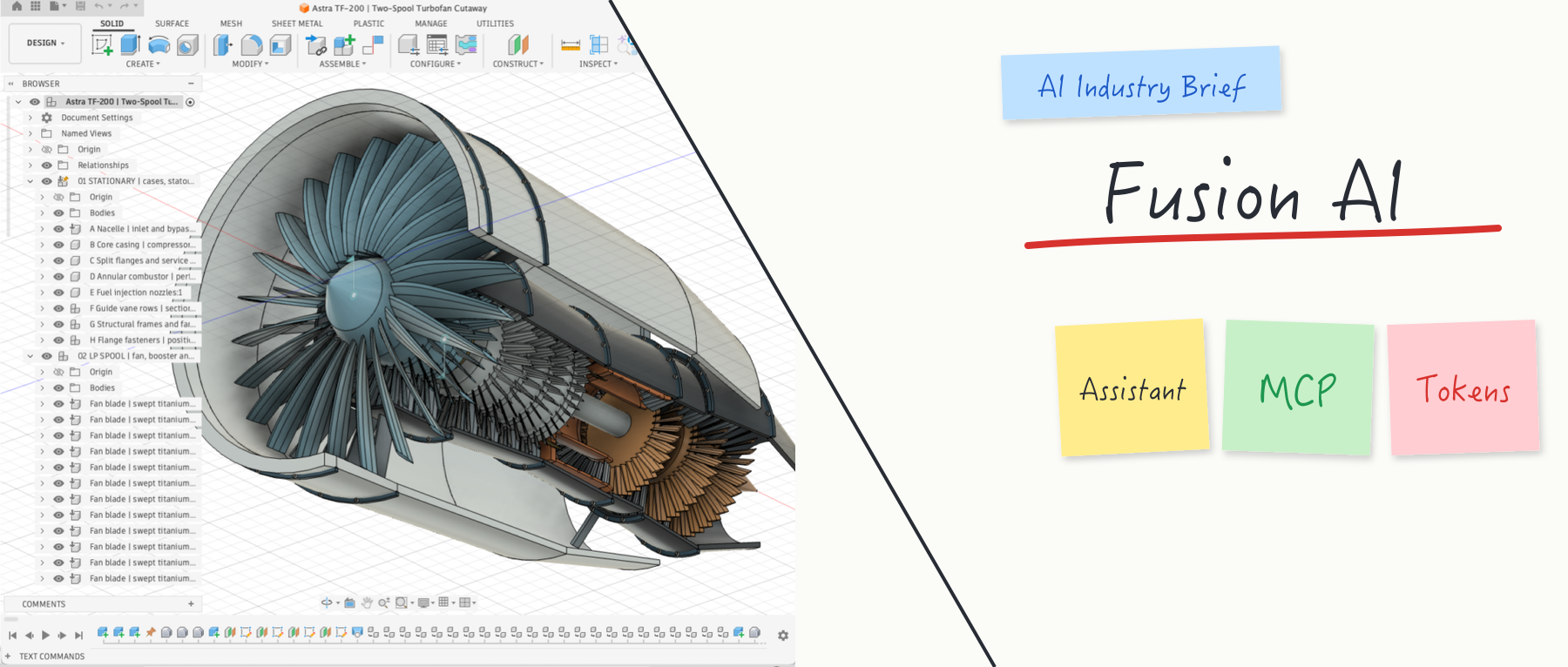
AI in Autodesk Fusion: Autodesk Assistant, three MCP servers and Flex token metering
An overview of AI in Autodesk Fusion as of October 2026: embedded AI features, the now generally available Autodesk Assistant and its documented limits, three MCP servers for local, data and cloud compute access, and Flex token metering.
In this article
Autodesk Fusion (formerly Fusion 360; "Fusion" below) is a combined cloud and desktop platform that integrates CAD, CAM, CAE, PCB design and data management. Between September and October 2026, Autodesk made a concentrated set of changes to its AI capabilities: the in-product Autodesk Assistant became available to all users, the number of official servers through which external AI agents can connect rose to three, and usage of the assistant's task-performing capabilities began to be metered in Flex tokens. This article uses Autodesk's official blog posts, help documentation and FAQ to set out how these capabilities are layered, the conditions under which they apply and their known limitations. Sources were checked as of October 25, 2026. All capability descriptions are vendor statements; CADFrontier has not tested them.
1. Terminology and capability layers
For the purpose of discussion, this article divides Fusion's AI-related capabilities into three layers:
- Embedded AI features: AI invoked within modeling or drawing commands without a conversation, such as sketch AutoConstrain and Automated drawings.
- In-product assistant: Autodesk Assistant, which accepts natural-language questions and instructions inside the Fusion interface.
- External agent interfaces: servers based on the Model Context Protocol (MCP). MCP is an open standard that lets external AI applications such as Claude, ChatGPT and Cursor discover and call the tools a piece of software exposes.
Autodesk's AI Automation product page lists five capabilities: Autodesk Assistant, Automated drawings, AI AutoConstrain, Generative design and CAM automation. The CAM automation entry describes CloudNC CAM Assist, a third-party add-in that generates machining strategies for 3-axis components; it is not an Autodesk feature.
2. Embedded AI features
Sketch AutoConstrain. According to the help documentation, the tool uses AI to generate several candidate sets of dimensions and constraints for a sketch. The user previews them, selects one and can set a datum. The documentation also notes that results should be reviewed by the user, and that complex sketches may require several runs before a fully constrained result appears.
AutoTimeline (Tech Preview). The October 21, 2026 update (v.2706.1.14) introduced AutoTimeline, which applies AI-assisted feature reconstruction to imported geometry without modeling history and produces an editable, parametric timeline. It is currently a Tech Preview available only to Fusion Design Extension users. For imported parts, whether the reconstructed feature tree reflects the original design intent has to be checked part by part.
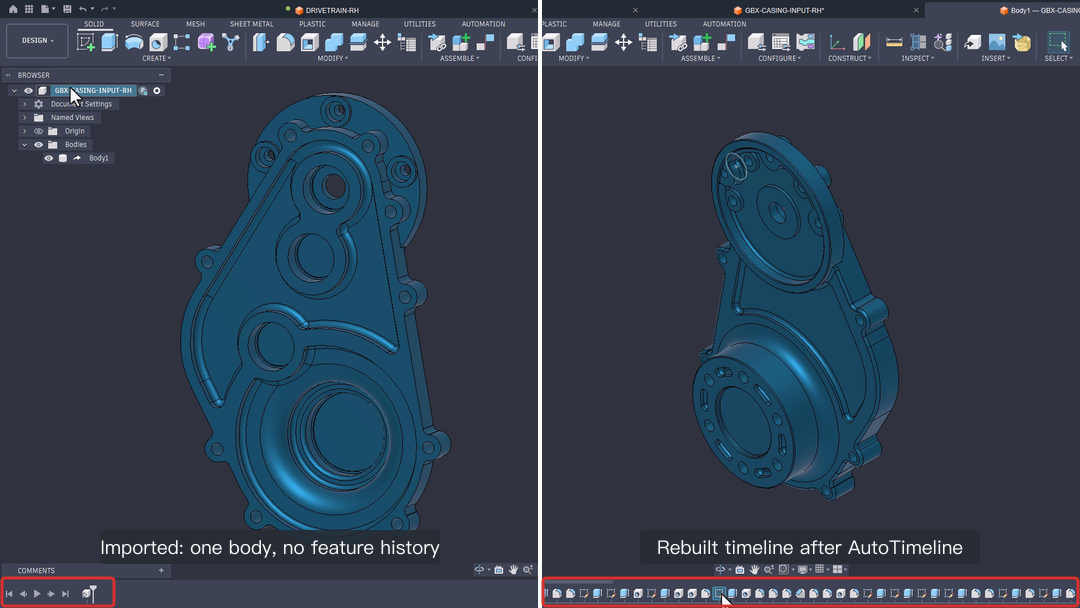
Figure 1: AutoTimeline before and after. Left: an imported single body with one item in the timeline. Right: the feature timeline generated by reconstruction (red box). Source: frame from the demo video in Autodesk's October 2026 Update blog post, © Autodesk; red boxes and labels added by CADFrontier.
Related features. The same update improved Find Similar, which now shows additional potential matches beyond the highest-confidence results; added Find Under Constrained, which lists under-constrained sketch geometry; and introduced System Modeler for visually automating repetitive workflows. Autodesk does not describe the last two as generative AI features; they are automation tools.
3. The in-product assistant: Autodesk Assistant
3.1 Scope of capabilities
According to an Autodesk blog post of October 1, 2026, Autodesk Assistant became generally available to all Fusion users at Autodesk University 2026, and users had held more than two million conversations with it since March. The assistant has also been deployed in Inventor, Moldflow and Vault.
The FAQ divides the assistant's agentic actions into three levels:
| Level | Meaning | Vendor example |
|---|---|---|
| Show me | Inspect the design without changing it | Query the mass of an assembly |
| With me | Complete a task step by step under the user's guidance | Help set up a component for manufacturing |
| For me | Prepare an action, show the plan and run it after the user approves | Add a 2 mm fillet to all edges of Body1 |
Geometry generated by the assistant is native, editable Fusion CAD geometry rather than a mesh. The October 21 update added the following: batch editing of the bill of materials (BOM) in natural language; creating and modifying Configuration Rules; reading the context of the current session, which in manufacturing workflows includes the assigned machine, tools, stock and supported errors; and explaining supported error and warning messages. The AI Visualization render command was also moved into the Render workspace, where it generates rendered scenes from natural language without changing the model or camera settings.
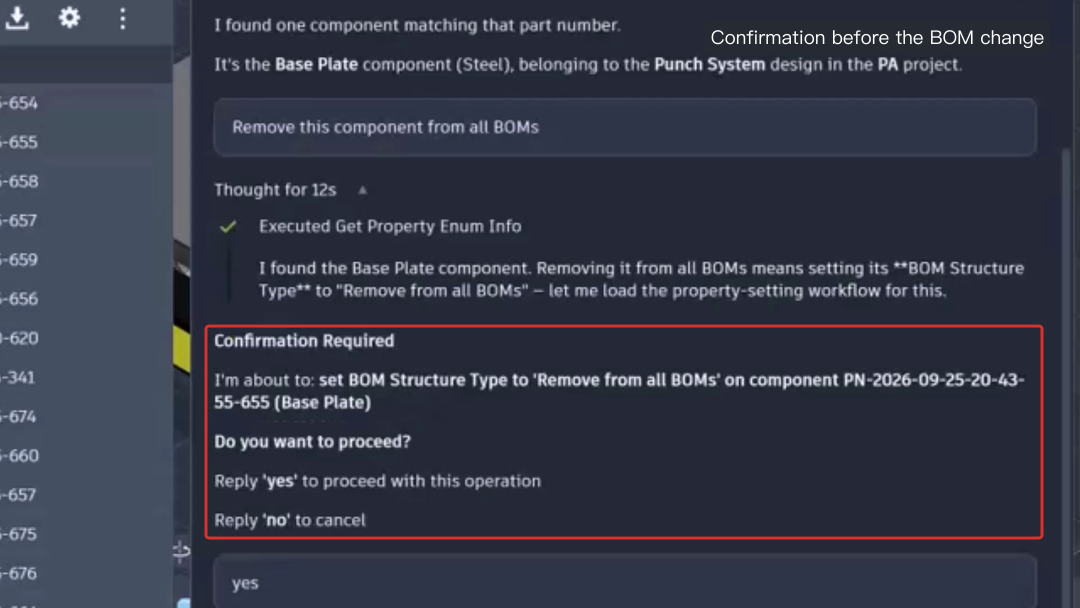
Figure 2: When asked to remove a component from all BOMs, Autodesk Assistant first lists the property change it is about to make and waits for the user to reply "yes". Source: frame from the demo video in Autodesk's October 2026 Update blog post, © Autodesk; red box and label added by CADFrontier.
3.2 Known limitations
The FAQ lists the following limitations, which should be taken into account when assessing practical uses of the assistant:
- The assistant can create sketches but cannot add sketch dimensions or constraints; these require tools such as AutoConstrain.
- Its capabilities are reduced in Assembly mode, where modeling operations may not work reliably; Autodesk recommends switching to Part or Hybrid mode.
- It cannot perform file-level operations such as open, close, save, rename or delete, and it cannot apply materials or appearances.
- Its awareness of the face or body the user has selected is limited, and it may not detect manual changes made between prompts.
- Coordinates may be interpreted as centimeters. For example, a position of [2, 0, 0] requested in inches may be placed at 2 cm.
- Describing a complex object, such as a stand or an assembly, in a single prompt often produces incorrect proportions, misplaced features and overlapping geometry. Autodesk recommends breaking the task into smaller steps with exact dimensions.
- A success report from the assistant means only that the tool executed; it does not guarantee that the geometry is as intended, so the result must be checked in the viewport after each step.
In addition, the assistant asks for confirmation before changing a design rather than acting silently, and Autodesk states that it is not an autonomous system that replaces user-driven, end-to-end design workflows. AI features may not be available in all regions.
4. External agent interfaces: three MCP servers
As of the date checked, Fusion offers three MCP servers. The overview page in the Fusion help documentation still lists only the first two; information on the third comes from the public beta announcement of September 15, 2026.
| Server | Released | Runs | Main purpose | Requirements |
|---|---|---|---|---|
| Fusion MCP | May 7, 2026 | Locally, alongside the Fusion desktop client | Real-time modeling, command execution and inspection of the active document | Fusion desktop running; enabled under Preferences > General > API; no authentication for the local connection |
| Fusion Data MCP | July 2, 2026 | Autodesk cloud | Querying and managing hubs, projects, folders, items and member permissions | Autodesk account sign-in; a client that supports the streamable HTTP transport with OAuth |
| Fusion Compute MCP | September 15, 2026 (public beta) | Autodesk cloud, starting Fusion instances per session | Parametric modeling, CAM setups and toolpaths, assemblies and joints, saving documents and exporting STEP/STL | Autodesk account, an active Fusion licence and a Fusion Team hub |
The first two servers use dynamic tooling: the client discovers the available tools at connection time, and the tool set may change between releases. Compute MCP exposes more than 7,000 endpoints of the Fusion TypeScript API behind a single execute tool. During the public beta, each user is limited to two concurrent sessions; a session lasts at most one hour and stops after 15 minutes of inactivity; sessions queue when the service is at capacity; and work must be saved to Fusion Team or exported before a session ends, otherwise it is lost. Autodesk notes in the announcement that the service provides the environment and tools, and that what an agent accomplishes depends on the language model driving it.
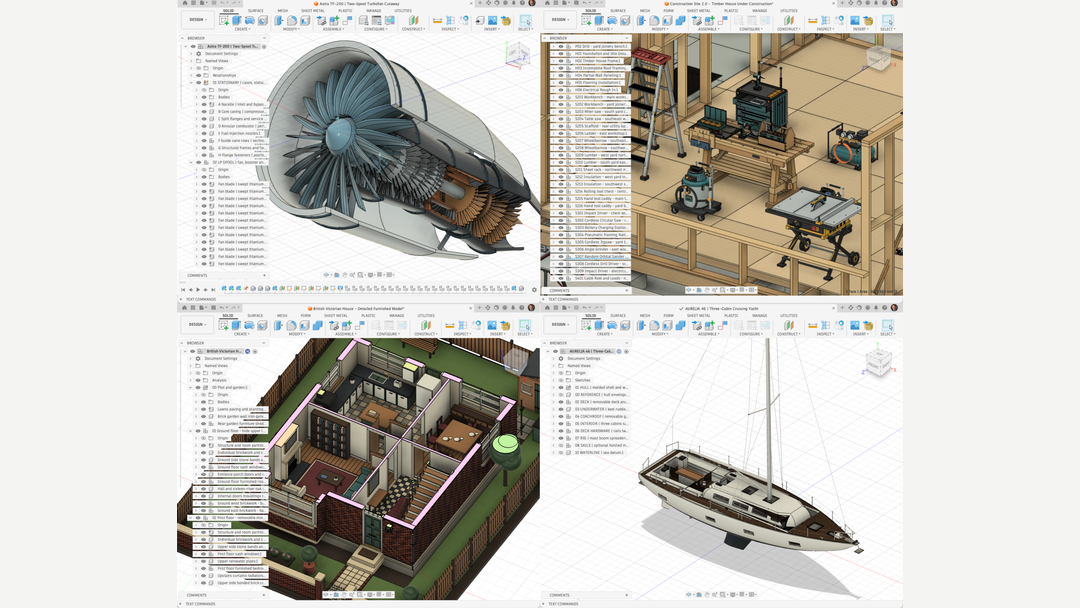
Figure 3: Example models that Autodesk says were created with Fusion Compute MCP (vendor claim). Source: image from Autodesk's blog post Fusion Compute MCP: Public Beta, © Autodesk.
The relationship between Autodesk Assistant and MCP can be summarized as follows: the former is a conversational feature inside the Fusion interface, and the latter is a standardized interface through which external AI applications access Fusion's commands and data. They serve different use cases and do not replace each other.
5. Usage metering: Flex tokens
The FAQ states that from October 13, 2026, when Autodesk Assistant performs agentic tasks (inspecting, guiding or modifying a design), usage counts against a monthly included allowance of Flex tokens (beta); asking only for information or general guidance does not use the allowance. Autodesk's blog post of October 1 lists the included allowance for each offering:
| Fusion offering | Included monthly Flex tokens (beta) |
|---|---|
| Personal | 10 |
| Students and educators | 10 |
| Trial | 10 for the 30-day trial, not refreshed |
| Commercial | 20 |
The allowance refreshes monthly on the subscription start date, and unused tokens do not carry over. On multi-seat subscriptions the allowance is shared by the team, and the total scales with the number of seats. Once the allowance is used up, commercial and personal users can continue with purchased Flex tokens; personal users who purchase tokens are moved to the commercial version. Students and educators cannot currently buy additional usage. Consumption does not correspond one-to-one with prompts; requests that involve more reasoning or planning use more. Because the offering is in beta, Autodesk says the included quantities may change.
6. Discussion
Comparison with earlier coverage. Our article on SOLIDWORKS' AI page described SOLIDWORKS' approach: built-in AI features plus role-based Virtual Companions (AURA and LEO), with usage metered in Blue Tokens, and external agent access relying mainly on community-built MCP servers. Fusion differs in two respects. First, it has a single, unified in-product assistant. Second, the vendor provides documented MCP servers for all three scenarios: local sessions, cloud data and cloud compute. Both vendors use a token model in which conversational questions are free and task execution is metered. For a wider comparison, see our survey of mainstream CAD and AI.
Implications for engineering use. Based on the public documentation, Fusion's more mature AI uses are currently in supporting steps whose output can be reviewed by a person: candidate sketch constraint schemes, batch edits to BOMs and configuration rules, manufacturing questions answered with session context, and handing repetitive operations to external scripts or agents through MCP. Generating a complex part or assembly directly from a single natural-language instruction is listed as a known limitation in Autodesk's own documentation. AutoTimeline and Compute MCP are in Tech Preview and public beta respectively, so their coverage and stability still need to be verified on specific parts.
Open questions. First, there is no published method for converting individual agentic actions into token consumption, which makes costs difficult to estimate before larger-scale use. Second, quotas and pricing for Compute MCP after the beta have not been announced. Third, regional availability depends on what is actually enabled for each user's account.
7. Conclusion
Fusion's current AI capabilities fall into three layers: AI features embedded in commands, a unified in-product assistant (Autodesk Assistant), and three MCP servers for external agents. The assistant is available to all users, and since October 13, 2026 its agentic actions have been metered in Flex tokens, with 10 and 20 tokens included per month for the personal and commercial offerings respectively. Autodesk's documentation describes the assistant's limitations in specific terms, including the inability to handle sketch dimensions and constraints, reduced capability in Assembly mode and possible misinterpretation of coordinate units. In engineering practice, a prudent approach is to treat AI output as a candidate result for review and to check each step in the viewport.
Sources & further reading
- Autodesk blog: Changes to Autodesk Assistant in Fusion ↗Source region: International
- Autodesk support: Autodesk Assistant in Autodesk Fusion – FAQ ↗Source region: International
- Autodesk blog: October 2026 Major Product Update – What's New ↗Source region: International
- Autodesk blog: Autodesk Fusion Compute MCP: Public Beta ↗Source region: International
- Fusion Help: Autodesk Fusion MCPs Overview ↗Source region: International
- Autodesk blog: Introducing the Fusion MCP ↗Source region: International
- Autodesk blog: Introducing the Autodesk Fusion Data MCP Server ↗Source region: International
- Autodesk product page: Fusion AI Automation ↗Source region: International
- Fusion Help: AutoConstrain ↗Source region: International