Open-source AI tools for NX / Designcenter: routes, existing projects and what they can do
Siemens has not shipped a modeling MCP, yet external agents can already drive NX through community projects. We set out the routes, eight existing projects, their stated capabilities, limits and risks, and the state of CAM.
In this article
Our earlier article set out Siemens' own AI plans for NX (now Designcenter). This article takes another angle: how external AI agents now operate NX through the Model Context Protocol (MCP) and the NXOpen interface, which tools exist, and what each can do. The sources are README files in GitHub repositories, vendor pages and third-party service pages, checked as of October 26, 2026. We did not install or run any of the tools; the tool counts, versions and validation claims below are the projects' own statements, and star counts are only an indicator of attention.
1. Background: no official modeling MCP yet; the tools come from the community and service providers
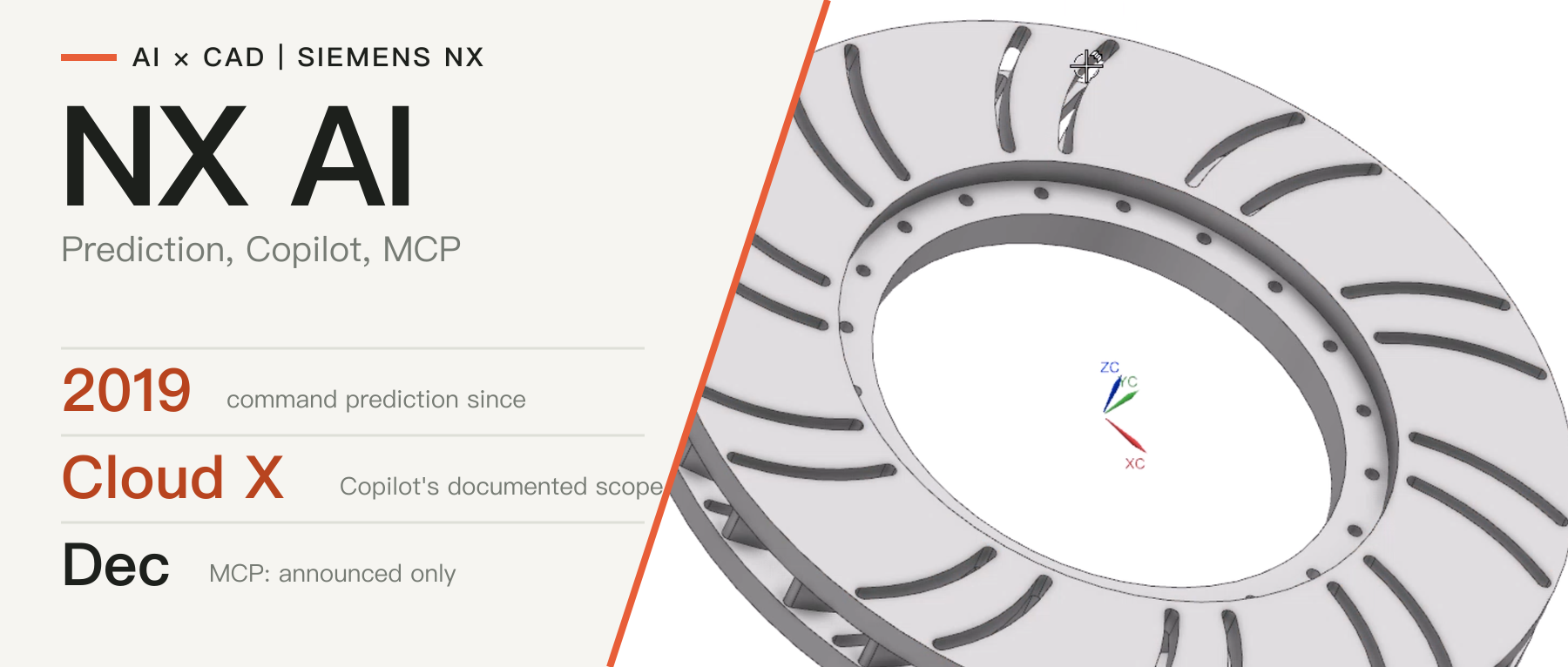
Siemens' What's New page lists Designcenter MCP under the December 2026 release, which had not shipped on the check date [14]; see our earlier article AI in Siemens NX. The service providers inteliScience and innfactory also say that, as far as they know, there is no official MCP server for NX modeling operations [11][13]. The tools discussed here are therefore not Siemens products but open-source community projects and third-party services.
These projects are very recent. The NX operation projects reviewed here were created between April and October 2026: the earliest is NX_MCP in April and most of the rest came after July [1][2][3][4][5][6][7]; a Teamcenter-side MCP project goes back to March [9].
2. Implementation routes
2.1 A common structure
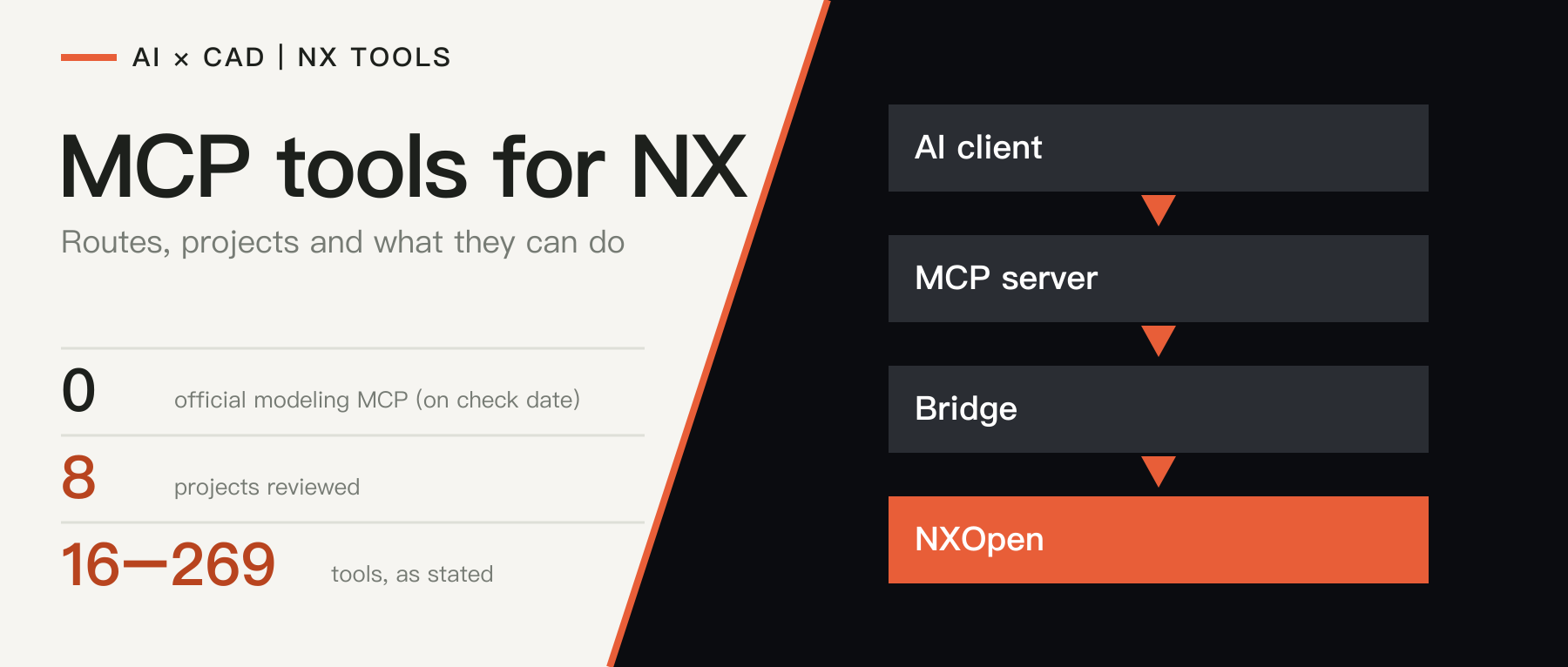
The operation-oriented projects share one structure: the AI client talks to an MCP server over standard input and output; the MCP server turns tool calls into requests to the local NX; inside NX a bridge program calls NXOpen in the NX process to do the modeling and returns the result.
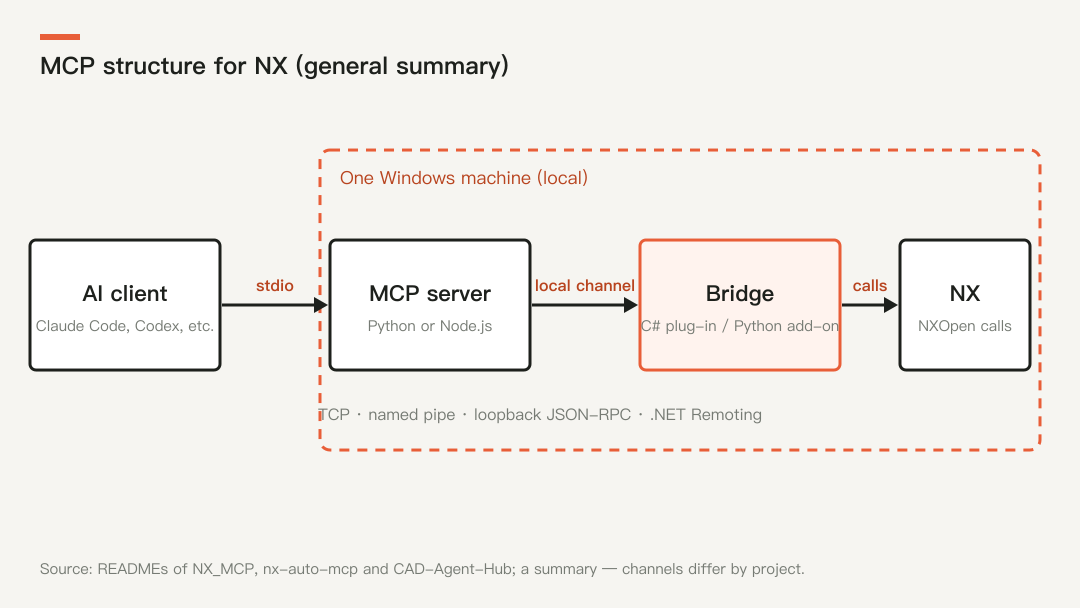
Figure 1: A common structure that we summarize from the documentation of NX_MCP, nx-auto-mcp and CAD-Agent-Hub; the exact channels differ by project. Drawn by CADFrontier.
The projects differ in three places: the language of the MCP server (Python or Node.js); the local channel between the server and NX; and the form of the bridge inside NX.
2.2 Four kinds of bridge
| Kind | How it works | Examples | Characteristics |
|---|---|---|---|
| Resident C# plug-in | Compiled as an NX managed plug-in, loaded when NX starts, listening on a local port or pipe inside the NX process | nx-auto-mcp (TCP) [3]; NX_MCP's C# GUI bridge (loopback JSON-RPC) [1]; CAD-Agent-Hub (.NET Remoting) [4]; nx-codex (named pipe) [5] | Fast, works inside an open NX window; must be built and signed locally |
| Resident Python add-on | A Python add-on is started in NX from a journal, stays resident with NX and provides a panel | skyf0l/siemens-nx-mcp [2] | The documented install is a pip install plus playing a journal in NX, with no build step mentioned; the panel shows what the agent is doing |
| Batch journal | Each call or session starts an NX process through run_journal, usually without a GUI | NX_MCP's Python batch bridge [1]; nx12-cli-mcp [8] | Simple; fixed start-up cost; does not take over the user's current window |
| Knowledge retrieval | Does not operate NX; gives agents that write NXOpen code accurate API documentation | nxopen-mcp [7] | Reduces API hallucination in generated code; needs the documentation of a locally installed NX |
The nx-auto-mcp documentation gives the difference between the first two: a resident plug-in round trip is typically 10–50 ms, while every journal run starts a new NX process with at least 1.5 s of fixed overhead [3] (project statement). The same document advises using tools for changing existing parts or querying state, and journals for large from-scratch builds [3].
2.3 Shared design trade-offs
The documents of several projects return to the same design questions:
- Typed tools or general code execution. NX_MCP exposes only typed tools by default [1] and nx-codex's bridge does not expose raw NXOpen session objects [5]; CAD-Agent-Hub offers
run_python, but it must be explicitly enabled [4]; the journal channel of nx-auto-mcp accepts only C# files [3]. - Read/write separation and undo. NX_MCP's object IDs are references within a session and must be queried again after an undo or reopen; a mutation whose execution state is unknown must not be replayed automatically [1].
- Who owns which part. skyf0l's add-on changes or saves a part only after the user ticks "Allow agent to change" it, and an "Ask me first" mode makes every agent step wait for approval [2]. nx-sketch-mcp requires explicit user authorization before taking over a part [6].
- Local only. NX_MCP's bridge binds only to 127.0.0.1 and authenticates requests with a session token [1].
2.4 Prerequisites
The common prerequisites are Windows, a locally installed and licensed NX, and the matching NXOpen version. Most need a self-built environment: the nx-auto-mcp repository ships no prebuilt DLL because NX requires managed plug-ins to be signed with the local SignDotNet [3]; the NX_MCP documentation also notes that loading an unsigned DLL needs an NX Open .NET author license [1].
3. Existing tools
The table is ordered from broad to narrow scope. Stars and dates are readings from October 26, 2026 and will change.
| Project | Form and route | Tools (stated) | NX versions claimed as verified | License, stars, created |
|---|---|---|---|---|
| skyf0l/siemens-nx-mcp [2] | Python MCP server + resident add-on in NX | 269 stated (tool documentation lists about 270) | 2406 tested; 2412–2606 expected | MIT, 4 stars, 2026-10-09 |
| cyw2527/nx-auto-mcp [3] | Node.js adapter + TCP + C# plug-in | 115 in the coverage table; 123 in the contract snapshot; 130+ in the opening paragraph | Developed against 2412 | MIT, 8 stars, 2026-09-20 |
| MCP/UG in Cai-aa/CAD-Agent-Hub [4] | Python MCP + .NET Remoting bridge | about 70 tool names listed in the README | 2412 | MIT, 117 stars (whole repository), 2026-07-28 |
| DreamEnding/NX_MCP [1] | Python server + C# GUI bridge or Python batch bridge | 16 by default; 34 more legacy tools hidden | batch 2506; GUI bridge 2206 (both on development builds) | MIT, 145 stars, 2026-04-17 |
| hcjrcsol123/nx-sketch-mcp [6] | Standard-library Python + .NET bridge | 20 | 2506 | no license seen, 0 stars, 2026-10-11 |
| jiaotashidi-bi/nx-codex [5] | Codex plug-in + named pipe + C# bridge | a restricted typed set | NXOpen 12.0.2.9 only | no license seen, 1 star, 2026-08-08 |
| Voss0919/nx12-cli-mcp [8] | NX 12 journals + CLI/MCP | 3 public tools | NX 12 | no license seen, 1 star, 2026-09-29 |
| mingfeng6684/nxopen-mcp [7] | Documentation retrieval; does not drive NX | retrieval | depends on local NX documentation | MIT, 17 stars, 2026-07-15 |
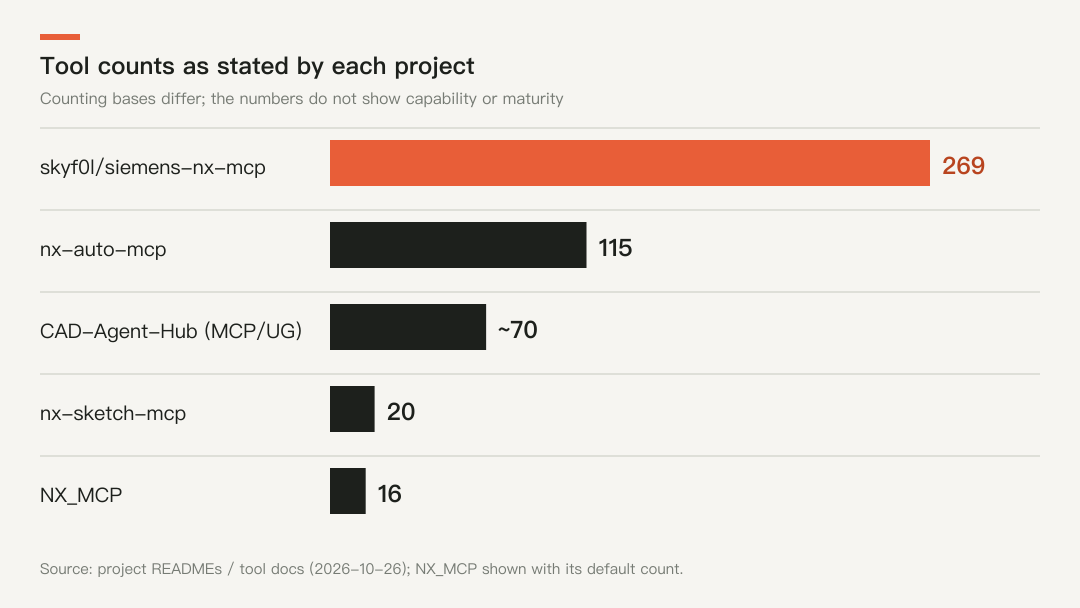
Figure 2: Tool counts as stated by each project. The counting bases differ, so the numbers do not indicate capability or maturity; NX_MCP is shown with its default count. Drawn by CADFrontier.
Two points deserve attention. First, the counting basis is inconsistent: the NX_MCP GitHub description still says "47+ tools" while its README says 16 tools are exposed by default and 34 legacy tools are hidden and unverified [1]; the opening paragraph of nx-auto-mcp says 130+ tools, its coverage table adds up to 115 and the contract snapshot in the repository lists 123 [3]. Second, NX_MCP, with the most stars, is not the project with the most tools and is still marked a development preview [1].
Two neighboring kinds of project also exist. A Teamcenter MCP server reaches parts, BOMs, datasets and change processes through REST interfaces without NX being open [9]; cam-agent-showcase is a sanitized reproduction of a CAM agent in which a language model proposes machining intents that deterministic validators and a plan builder then process, with the NX executor only a placeholder [10]. Among service providers, inteliScience offers typed tools in an NX session and advises putting read-only tools live first, with preview and confirmation before every write [11][12].
4. What they can do
4.1 By capability area
The table is compiled from the tools or scope listed in each project's documents. A ✓ means the documents list such tools; a blank means the documents do not list them, not that the capability is absent.
| Area | skyf0l [2] | nx-auto-mcp [3] | CAD-Agent-Hub [4] | NX_MCP [1] | nx-sketch-mcp [6] |
|---|---|---|---|---|---|
| Parts, files, STEP export | ✓ | ✓ | ✓ | ✓ | save a copy |
| Sketches (lines, circles, rectangles…) | ✓ | ✓ | ✓ | lines, rectangles | lines, rectangles, circles |
| Extrude | ✓ | ✓ | ✓ | ✓ | single circle or rectangle only |
| Revolve, sweep, loft | ✓ | ✓ | ✓ | ||
| Holes, chamfers, blends, patterns, shell | ✓ | ✓ | ✓ | threads | |
| Synchronous modeling, surfaces | ✓ | ✓ | surfaces ✓ | ||
| Assemblies and constraints | ✓ | ✓ | ✓ | ||
| Sheet metal | ✓ | ✓ | ✓ (with flat-pattern DXF) | ||
| Measurement and inspection | ✓ | ✓ | ✓ | listing | ✓ |
| Drawings | ✓ | ✓ | |||
| CAM | ✓ |
The skyf0l tool documentation also lists motion, topology optimization, Knowledge Fusion rules, threads and render materials [2]; these are project statements and we did not verify their effect.
4.2 Typical calls
The NX_MCP documentation gives a minimal example: create a 20 × 10 × 12.5 mm block in nine steps — status check, new part, new sketch, draw a rectangle, finish the sketch, extrude, list bodies and features, save, export STEP [1]. The sample prompt of skyf0l is: create a 100 × 60 × 10 mm plate with four 6.6 mm holes 10 mm from the edges and show a picture [2].
4.3 The state of CAM
CAD-Agent-Hub has the most CAM tools in the public material: it can create the machining setup, coordinate system and workpiece, tools and operations, set geometry and feeds, generate toolpaths and export CLSF; version 0.20 added a machine-simulation readiness check and protected simulation with collision stop [4]. Its post-processing tool is disabled by default, needs an environment variable and a confirmation, and its output is explicitly marked as uncertified, still requiring independent machine simulation, a dry run and operator approval [4].
Two things should be kept apart. Such tools expose NX CAM objects and operations to an agent, which is a programmable foundation; they are not one-click automatic programming. cam-agent-showcase lets the model propose only machining intents, and deterministic rules validate them and build the operation plan, so the model neither writes nor runs NXOpen code [10]. NX's own feature-based machining is a different route that depends on rules configured by the company in advance and is not an MCP tool.
5. Limits and risks
- Maturity. Most projects are less than half a year old, and skyf0l was created on October 9 [2]; NX_MCP is still marked
0.2.0.dev0, its default workflow was verified in NX 2506 batch mode, and acceptance of the same candidate in both environments is not finished [1]; the RC1 of nx-codex officially supports only NXOpen 12.0.2.9 and refuses writes on other versions [5]. - Version coverage. The versions claimed as verified are scattered among 2206, 2406, 2412, 2506 and 12.0.2.9, and no project claims verified coverage of the current 2606 [1][2][3][5][6]; skyf0l says only "expected to work" for 2606 [2].
- How validation is stated. NX_MCP separates "available by default", "automated tests" and "real NX acceptance" [1]; CAD-Agent-Hub warns that a successful API call does not prove that a model, drawing or simulation result is right, and that the real state in NX must be checked [4].
- Code-execution rights. These services operate NX with the user's rights on the local machine, and projects that offer
run_pythonor a journal channel disable it by default or require explicit enabling [1][3][4]; the shared advice in their security notes is to open only files and scripts from trusted sources. - Tool count is not capability. Even one project's description and README can give different tool counts [1][3], and most have no third-party evaluation.
6. Discussion and conclusion
On the public evidence, AI tools for NX are at a community-exploration stage: there is no official modeling MCP, and within weeks several projects grew from a dozen tools to more than a hundred or even two hundred, covering modeling, assemblies, sheet metal, drawings and part of CAM. The implementation route has converged — an MCP server plus a local bridge plus NXOpen — and the differences lie mainly in the form of the bridge, whether arbitrary code execution is allowed, and how people confirm and undo.
We consider that the value of these projects is to show that the route is workable and to offer design trade-offs that companies can refer to, but their maturity, version coverage and validation evidence are not enough for direct production use: most are individual projects, need to be built and signed locally, are some distance from the current 2606, and lack third-party evaluation. For teams that need to use them inside a company, we consider it safer to begin with read-only tools for inspecting parts, then open write operations gradually, keeping preview, confirmation and undo.
Sources & further reading
- GitHub: DreamEnding/NX_MCP ↗Source region: International
- GitHub: skyf0l/siemens-nx-mcp ↗Source region: International
- GitHub: cyw2527/nx-auto-mcp ↗Source region: International
- GitHub: Cai-aa/CAD-Agent-Hub (MCP/UG) ↗Source region: International
- GitHub: jiaotashidi-bi/nx-codex ↗Source region: International
- GitHub: hcjrcsol123/nx-sketch-mcp ↗Source region: International
- GitHub: mingfeng6684/nxopen-mcp ↗Source region: International
- GitHub: Voss0919/nx12-cli-mcp ↗Source region: International
- GitHub: goenninger-b-t/tc-mcp (Teamcenter) ↗Source region: International
- GitHub: xiaqiyua3-svg/cam-agent-showcase ↗Source region: International
- inteliScience: NX CAD MCP (service-provider page) ↗Source region: International
- inteliScience: Siemens NX MCP Server (service-provider page) ↗Source region: International
- innfactory: Use Siemens NX with AI via MCP (service-provider page) ↗Source region: International
- Siemens: What’s New In Designcenter CAD (December 2026 section) ↗Source region: International