AI in Siemens NX: command prediction, Copilot and an MCP that is only announced
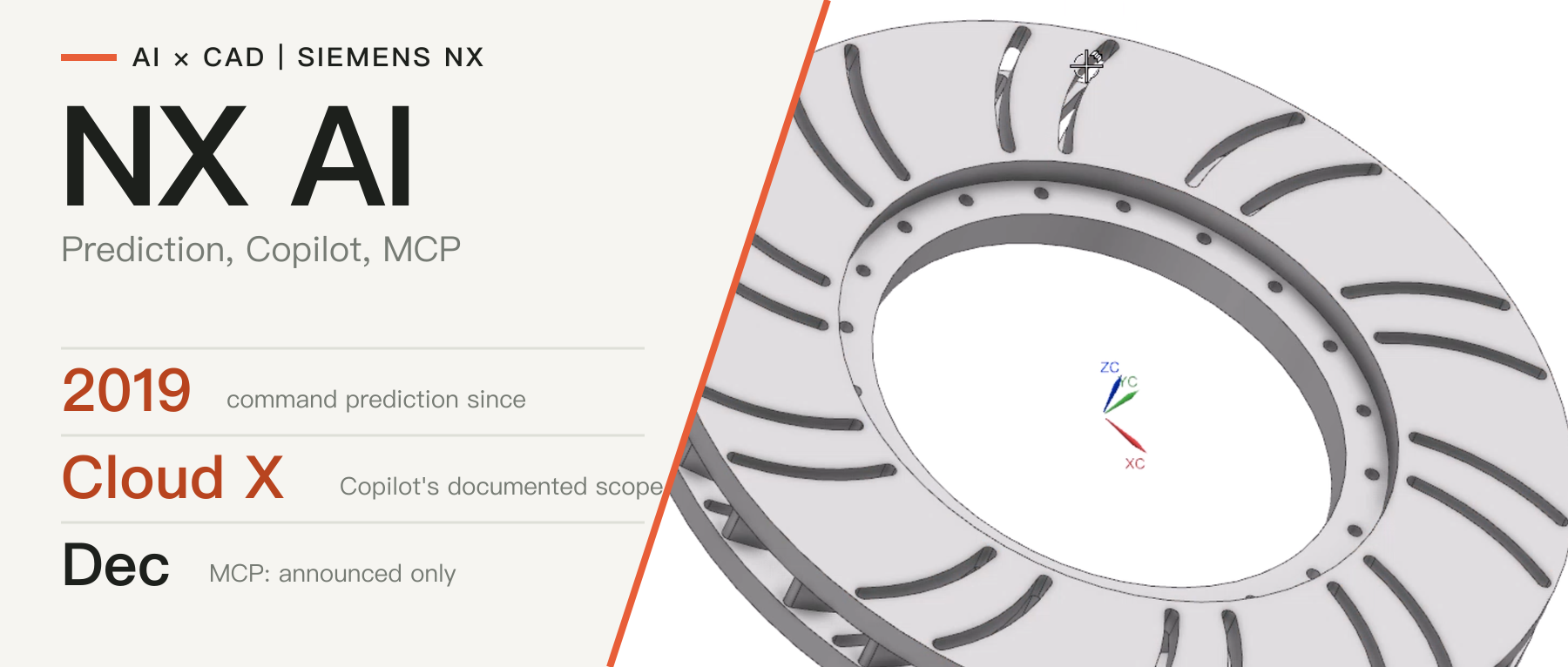
Siemens has folded NX into Designcenter. We set out the state of its AI from official sources: predictive features since 2019, a Copilot aimed at the cloud X line, Designcenter MCP listed under the December release, and the gaps in the material.
In this article
The product commonly called NX has been renamed Designcenter since the June 2026 release. The desktop edition is called Designcenter and the cloud edition Designcenter X, which comes in four tiers: Essentials, Standard, Advanced and Premium [3]. "NX" below means the mechanical CAD line within Designcenter.
This article uses Siemens' official pages and blog posts to describe the current state of its AI. Sources were checked as of October 25, 2026. All capability descriptions are vendor statements and have not been tested by CADFrontier; coverage of Realize LIVE 2026 comes only from press reports and is marked as such.
1. Two kinds of features and one announcement
The official AI page groups the capabilities into analysis, optimization and generation [1]. Together with the release notes, they can be divided by interaction style into three layers:
- Predictive features: suggest the next step or select objects in bulk within existing operations, without a conversation.
- Copilot: answers natural-language questions based on product documentation.
- Announced specialized agents and Designcenter MCP: listed under the December 2026 release and not yet available as of the date checked [2].
Siemens says these AI features are used more than 500,000 times a month [3].
2. Predictive features
The table below lists the features named in the official material [1][3][4].
| Feature | When | Official description |
|---|---|---|
| Command Prediction | Introduced in 2019 | Suggests the next command based on the current operation |
| Topology Optimization, PMI annotation prediction, voice commands | Added over the following years | Lightweighting exploration; automatic PMI annotation; running commands by voice |
| Selection Prediction | Listed on the official AI page | Previews the objects you are likely to select, then lets you add or remove |
| Select Similar Faces/Edges | December 2025 release | After selecting one feature, finds all similar faces or edges by a sensitivity setting and supports bulk blends, chamfers or pattern recognition |
| PMI annotation plane and model view prediction | December 2025 release | Predicts annotation planes with domain-specific machine-learning models, optionally trained on a company's own data |
For structural design the value of this layer lies in repetitive work. A single part can contain hundreds of features, and when one class of them has to change, bulk selection reduces point-by-point picking. Siemens says the goal of these features is to avoid disrupting the workflow [4]. The official AI page gives marketing percentages for time savings but does not state the test conditions, so this article does not cite them.
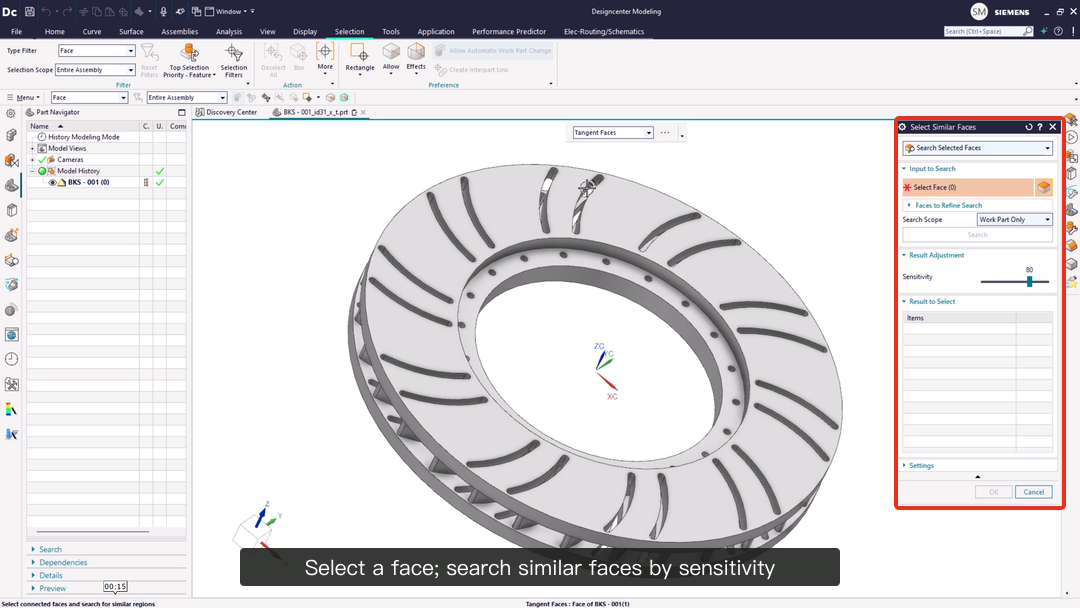
Figure 1: Select Similar Faces. After one face is selected, the panel on the right searches for similar faces at a chosen sensitivity (80 in the figure). Source: image from Siemens' Designcenter blog post on AI-enabled design in the December 2025 release, © Siemens; red box and label added by CADFrontier.
3. Copilot
3.1 What it does
According to the official Tips post, Copilot is opened in a Designcenter X NX session by clicking the double-star icon next to the search bar. Answers carry numbered sources, highlighted words link directly to the path of the corresponding command, and suggested prompts draw on the commands used recently in the session; Copilot does not access personal user data [5].
The June 2026 release notes add that answers are grounded in Designcenter documentation and best practices, take the active application, task and conversation history into account, and are saved so that past conversations can be resumed [3].
The official AI page describes an industrial copilot powered by Microsoft Phi-3 and mentions uses such as making design changes and answering questions about simulation results [1].
In the public examples, the use that is actually demonstrated is process guidance: step-by-step help for infrequently used, multi-step operations, with a clearance check and animation of a safety gate as the example [5]. For changing a design or providing simulation results, the official material gives no demonstration that can be checked.
3.2 Under which licenses it is available
The public material is not consistent about availability [5][6]:
- A Siemens blog post from August 2025 describes Design Copilot NX as an add-on module under Value Based Licensing for the Standard, Advanced and Premium tiers, available only as cloud SaaS [6].
- The Tips post from May 2026 says Copilot is available in Designcenter X NX and in Designcenter X NX with built-in data management [5].
- The official material does not say whether the locally installed desktop edition of Designcenter includes Copilot.
This article considers the safest reading, until these statements are reconciled, to be that Copilot is currently aimed at the cloud X product line, and that the exact tier and whether it draws on the Value Based Licensing allowance should be confirmed with the license administrator or reseller. Teams that have not moved to the cloud should not assume the menu already contains Copilot. For the predictive features, the official material does not say they are restricted to the cloud or to an extra license, but that too should be confirmed against the actual license.
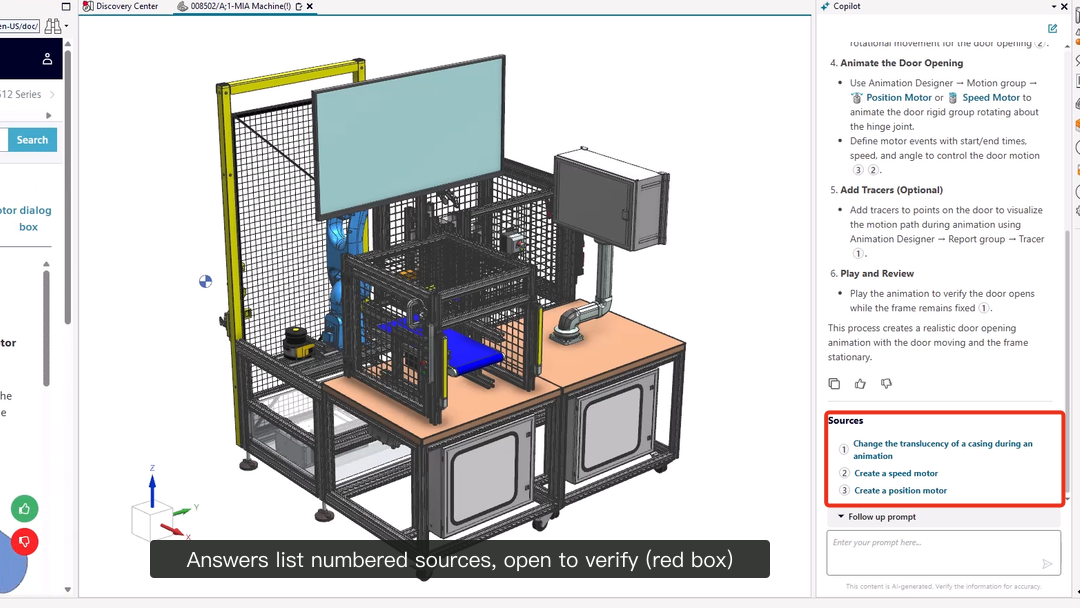
Figure 2: Copilot in Designcenter X NX. The numbered sources at the end of the answer are boxed in red; the corresponding documentation page is on the left. Source: image from Siemens' Designcenter Tips blog post on Copilot, © Siemens; red box and label added by CADFrontier.
4. Announced: specialized agents and Designcenter MCP
In its December 2026 section, the official What's New page says the release brings enhanced Copilot capabilities, specialized engineering agents, intelligent search, automated documentation and Designcenter MCP, which connects a supported AI environment to the Designcenter API through controlled access so that conversational engineering workflows can be built on a company's own standards and processes [2].
As of the date checked, that release has not been published, and this article did not find technical documentation for Designcenter MCP, the clients it supports, regional availability or licensing. It should therefore be treated as a vendor roadmap item, not as a delivered capability.
Press coverage of Realize LIVE 2026 mentions two further points (secondary source) [7]. The first is Intelligence Center X, which, according to the report, lets companies build their own AI agents on a low-code platform with clear permission boundaries and traceability.
The second is Simcenter PhysicsAI Generate, planned for December, which can generate a concept part from the part's requirements and the surrounding assembly and, using Synchronous Technology, produce editable parametric CAD. For neither is there official documentation that can be checked.
5. Discussion and conclusion
Compared with SOLIDWORKS and Autodesk Fusion, both covered on this site, Siemens has the longest history of predictive features (since 2019), a Copilot that centers on answering questions from documentation, and a Copilot aimed at the cloud X product line. On openness to external AI environments, SOLIDWORKS currently relies mainly on community-built servers, Fusion already has three vendor-documented MCP servers, and Siemens is still at the announcement stage.
This article concludes that the current state of AI in Siemens' CAD can be summarized as follows: predictive features have shipped with releases for years, Copilot's value is in reducing time spent looking things up rather than replacing design work, and anything aimed at external agents has to be re-checked once the December release is out. The official AI is a different route from community-built NX interfaces and third-party add-ons, which are not official Siemens products.
Sources & further reading
- Siemens: AI-enabled CAD capabilities in Designcenter CAD (official AI page) ↗Source region: International
- Siemens: What’s New In Designcenter CAD (June and December 2026 sections) ↗Source region: International
- Siemens Designcenter blog: Designcenter is for everyone | June 2026 release ↗Source region: International
- Siemens Designcenter blog: AI-enabled design | December 2025 release ↗Source region: International
- Siemens Designcenter blog: Designcenter X NX | Tips and Tricks | Copilot ↗Source region: International
- Siemens Designcenter blog: How to learn NX CAD ↗Source region: International
- DEVELOP3D: Siemens Realize Live 2026 (press report, secondary) ↗Source region: United Kingdom