Text-to-CAD: where one-sentence parts stand — routes, open source and benchmarks
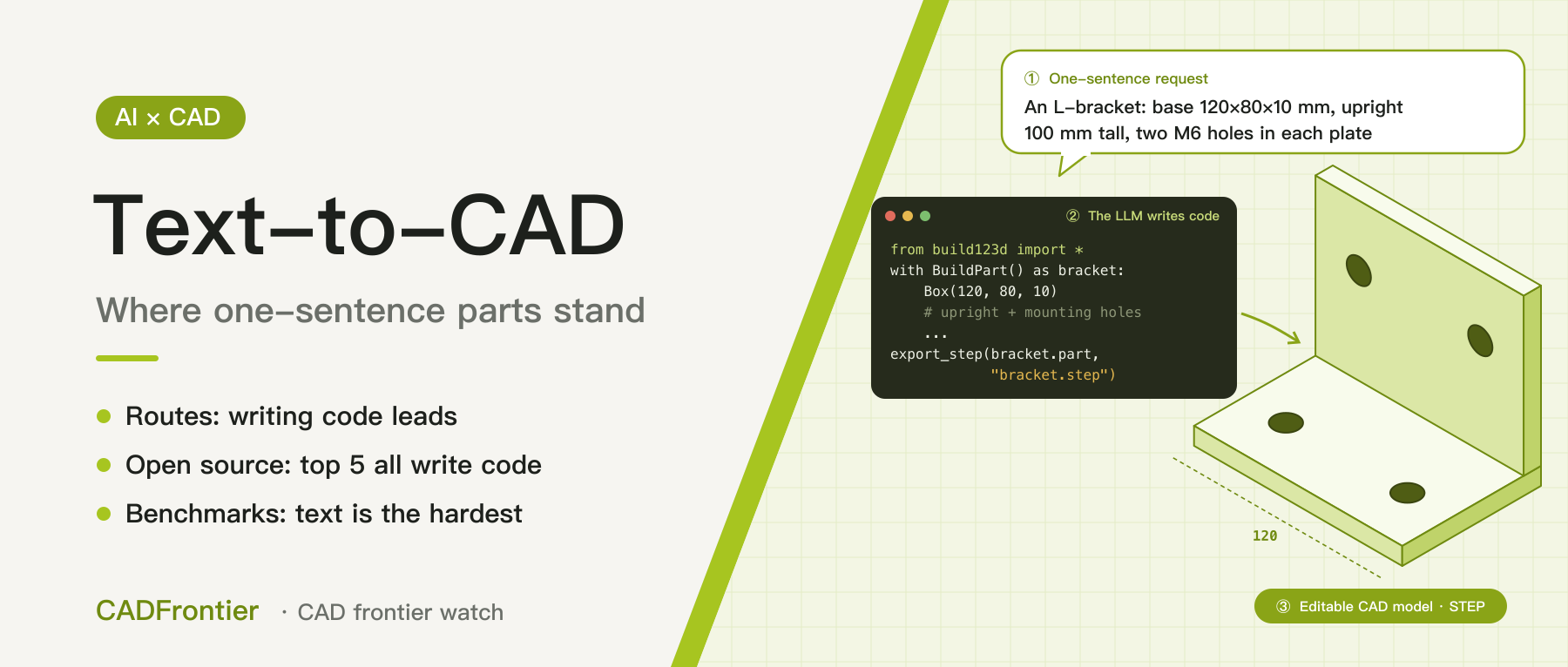
Writing code has become the main route for text-to-CAD, and the top five open-source projects on GitHub all take it. Yet five benchmarks agree that text is the hardest input and editing is harder than creating. We review routes, open source, products and benchmarks, and sort parts into three groups.
In this article
"One sentence in, one part out" is probably the most watched idea in AI for CAD. The most popular open-source text-to-CAD project on GitHub was only created this April and has passed 25,000 stars in six months. Yet the latest benchmark results point to a counter-intuitive conclusion: for AI, text is actually the hardest input. The same system scores 84.66 when modelling from engineering drawings, but only 50.87 when modelling from text. This site has previously covered Adam's route in AI CAD and the CADEngBench multi-dimensional evaluation. This article looks at text-to-CAD itself: the technical routes, what the open-source community is building, where commercial products stand, and what the benchmarks show. Sources were checked as of November 6, 2026; this is desk research, not a hands-on test.
1. Three technical routes
- Generating modelling command sequences: the modelling process is broken into commands such as "sketch, extrude", and a model generates them in order. Representative work includes DeepCAD (2021) and Text2CAD (NeurIPS 2024). The catch is that these commands are not a "language" large language models already know, so a dedicated model usually has to be trained from scratch, and the supported edit operations are limited.
- Having an LLM write modelling code: the model writes CadQuery, build123d or OpenSCAD code, which is then executed to produce a real solid model. This taps directly into what general-purpose LLMs do best — writing code — and the result is parametric and editable by nature. Most new research in 2026 builds on this route; one example lets the model name the edges to fillet in natural language, and a second model maps them to actual geometric edges.
- Generating B-Rep directly: skipping code and generating boundary-representation solids. This route is still at the research stage. Zoo experimented early on with generating B-Rep straight from text, then changed course for two reasons: its own modelling language, KCL, was maturing, and LLM coding ability improved rapidly from 2023. Autodesk has announced neural CAD, which it says will generate editable geometry directly, but it has not been released yet.
For now the code-writing route has the upper hand, because it borrows the strongest capability of general-purpose LLMs.
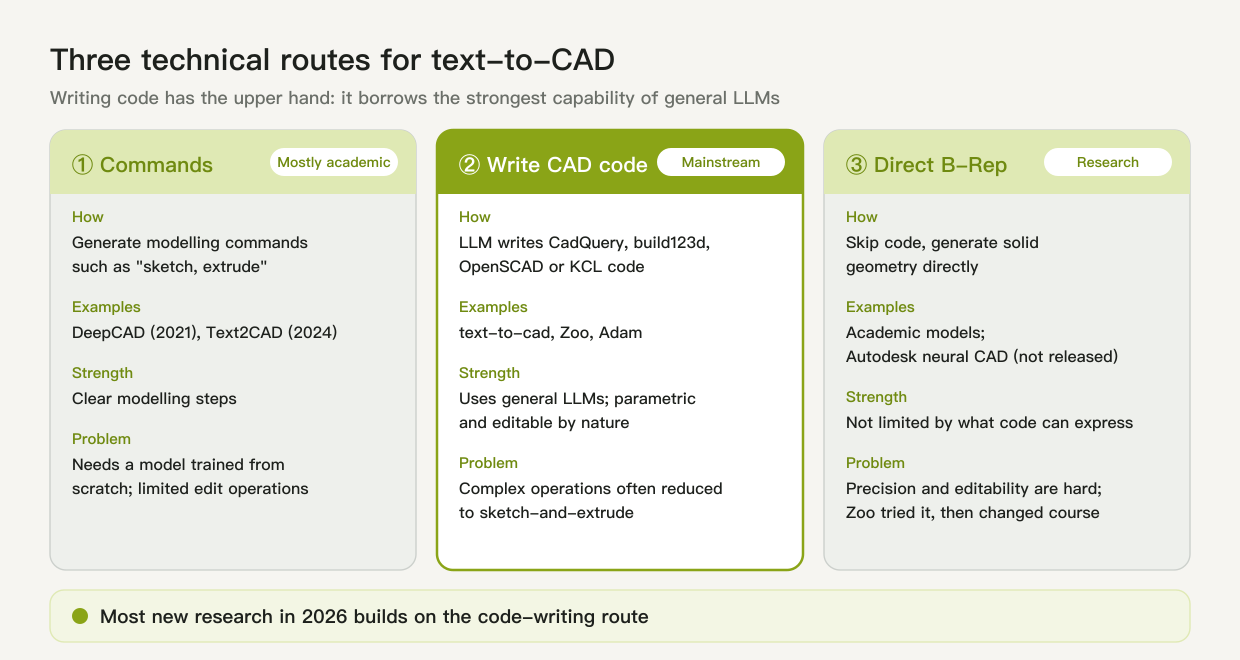
Figure 1: Three technical routes for text-to-CAD. Illustration by CADFrontier.
2. Open source: the top 5 on GitHub by stars
We searched GitHub for text-to-CAD projects and ranked them by stars (data from November 6, 2026). The criterion was "built to generate mechanical CAD models from text or natural language"; KiCad plug-ins for PCB design and interface projects that let AI operate FreeCAD were excluded. The top five:
- text-to-cad (about 25,700 stars): a plug-in and skill pack for general coding agents such as Claude Code, Codex and Cursor. The agent writes Python with build123d, exports STEP, STL and 3MF, runs manufacturability checks, produces drawings, and can connect to 3D-printing and CNC machining services.
- Amagine3D (about 6,300 stars): starts from hardware requirements, lays out internal components first, then designs the enclosure and assembly structure, mainly for printable smart-hardware enclosures; also built on build123d, it exports STEP and writes parameter changes back to the source code.
- CADAM (about 5,400 stars): Adam's open-source web app, based on OpenSCAD and running in the browser; it exports STL, SCAD and DXF and automatically turns extracted dimensions into sliders.
- Zoo Design Studio (about 1,300 stars): every part is represented as readable KCL code, and point-and-click operations in the UI ultimately edit that code; it includes the conversational agent Zookeeper.
- Multi-Agent-CAD (about 1,070 stars): a multi-agent framework from a Tsinghua University team that extends from single parts to assemblies and can export URDF for robot simulation; it is also mainly based on build123d.
Three things they share:
- All five have the LLM write code; none generates geometry directly.
- The two most-starred projects are both built on build123d, which runs on the open-source kernel OCCT (see our article on OCCT).
- The most popular one is not even a dedicated model but a skill pack for general coding agents. This matches the view of Adam's CEO: rely on a general LLM and give it just two tools, writing code and looking at screenshots.
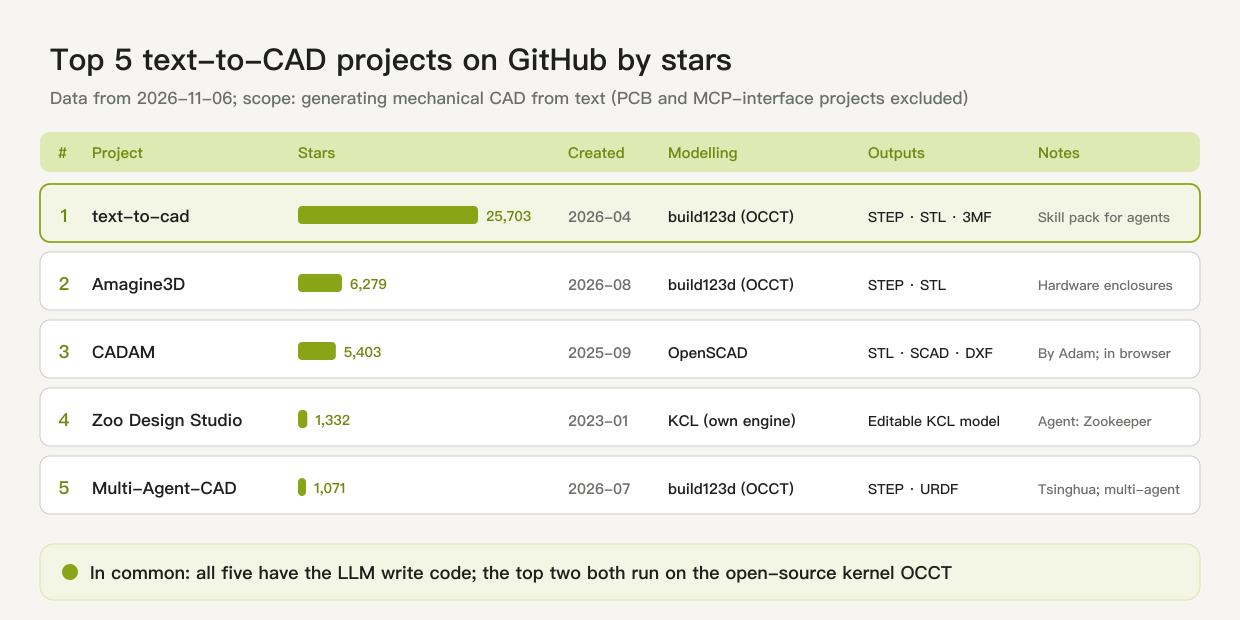
Figure 2: The top 5 text-to-CAD projects on GitHub by stars (data from 2026-11-06). Illustration by CADFrontier.
3. Commercial products: start-ups are moving, the big vendors have not shipped text-to-geometry
- Zoo: has turned its original text-to-CAD tool into the conversational agent Zookeeper; since March 2026 it can also take uploaded PDF or DXF drawings and model from them, or rebuild STEP files from other CAD systems as annotated KCL code.
- Adam: follows the same route of writing code plus looking at screenshots.
- Large vendors: the new LEO capabilities in SOLIDWORKS 2027 focus on faster assemblies, macro writing, Q&A and drawings, with no mention of generating part geometry from text; Onshape's experimental FeatureScript MCP leans towards generating reusable custom-feature code from text rather than producing parts directly; Autodesk's neural CAD is still "coming soon".
4. What the benchmarks show
Text-to-CAD benchmarks have multiplied this year, but they measure different things. We first set out what each one is for, then what they show together.
Five benchmarks and what each measures
- CADBench V3 (gNucleus AI, September 2026): currently the only benchmark with a public, workflow-based leaderboard that tests text and drawings within the same task set. Its 100 tasks fall into three types: 30 text-to-CAD creation tasks, 30 create-then-edit-by-text tasks, and 40 tasks modelling from engineering drawings. Systems model in a pinned FreeCAD environment and submit native CAD files, which a separate verifier scores on geometric similarity and agreement with the specified dimensions. On the September 24 leaderboard, Claude Opus 5.5 with Claude Code ranked first at 61.03 overall; broken down, it scored 84.66 on drawings, 50.87 on text creation and 39.69 on editing by text.
- Text2CAD-Bench (May 2026): dedicated to generating parametric CAD from text. It has 600 human-curated examples at four levels: levels 1–2 cover basic geometry and standard features, level 3 covers complex topology and freeform surfaces, and level 4 extends to real-world domains beyond mechanical parts. Each example comes in two prompt styles: a geometric description like a non-expert would write, and a procedural sequence like an engineer would write.
- BenchCAD (May 2026): focused on industrial parts. It contains 17,900 execution-verified CadQuery programs across 106 industrial part families, such as bevel gears, compression springs and twist drills. Inputs are mainly images, and it also tests instruction-guided code editing; the question is whether a model can write parametric programs that reflect how engineers actually design parts.
- RealCADBench (September 2026): tasks come from real industrial design intents — 12,632 tasks across 19 factory-automation categories, covering both parts and assemblies. There are four input types: text descriptions, 2D engineering drawings, real product photos and rendered images. Every model writes FreeCAD Python code, evaluated on executability, solid IoU, surface IoU and a rubric-based judge.
- MUSE (May 2026): dedicated to multi-part assemblies. Each task comes with a structured design specification and asks for an editable assembly, evaluated on four dimensions: code executability, geometric validity, structural and interface fidelity, and functional consistency.
What can be concluded so far
Taken together, the five benchmarks agree: AI can already build simple parts, but it is still clearly short of delivering usable models to a requirement. Five points stand out:
- Text is the hardest input. In CADBench the same system scores 84.66 on drawings but only 50.87 on text creation; moving from Opus 5 to 5.5 added 22 points on drawings but only 1.4 on text. Dimensions on a drawing are explicit; a text description is inherently vague.
- Editing is harder than creating. Editing by text is the lowest-scoring of CADBench's three task types; in the first results from 11 systems, six tasks received zero from every system, and all six were editing tasks.
- Running is not the same as being right. In RealCADBench, six frontier LLMs reached executability of 0.565 to 0.812 across the four part input types, but solid IoU of only 0.28 to 0.54; MUSE likewise finds that code that runs does not guarantee a correct assembly structure or mating interfaces.
- Simple geometry works; complex features are the weak spot. In Text2CAD-Bench, models do reasonably on basic geometry but degrade clearly on complex topology and advanced features; BenchCAD finds that models often recover only the rough outer shape, replace key operations such as sweeps, lofts and twist-extrudes with simpler sketch-and-extrude, and generalise poorly to unseen part families.
- There is no all-round winner, and the score is not just the model's. In RealCADBench no model leads all four metrics; CADBench also cautions that results depend on the whole model-plus-agent configuration and should not be read as model capability alone.
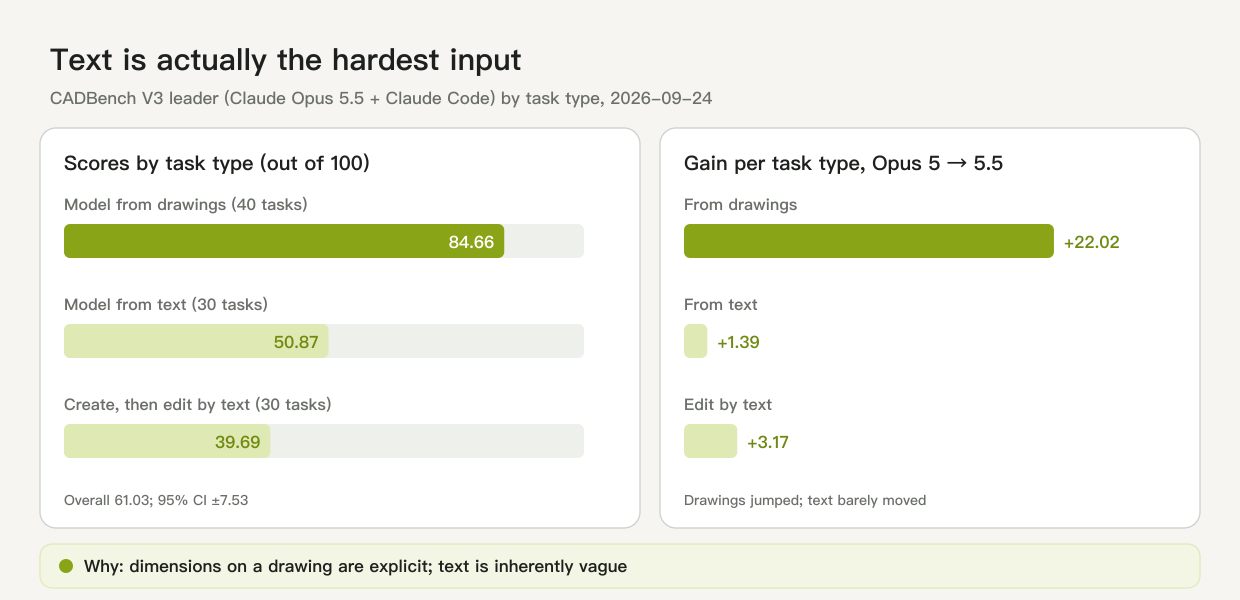
Figure 3: Scores of the CADBench V3 leader (Claude Opus 5.5 + Claude Code) by task type, and gains after the upgrade, 2026-09-24. Illustration by CADFrontier.
5. Our view: three kinds of parts, separated by how much information a sentence carries
Text is hardest in the benchmarks because the information is incomplete. But whether one sentence can produce a part depends on the part. The difference is not whether AI can model, but whether the sentence carries complete information. On that basis, parts fall into three groups:
- Standard parts: one sentence is enough. Take "GB/T 818 M3×10 cross-recessed pan head screw": behind that phrase is a full national standard specifying head diameter and height, recess type, thread size and nominal length. The AI does not need to guess; it only needs to look up the standard and apply the parameters. This group can already be generated entirely from one sentence.
- Custom parts built on company standards: these can also be generated fairly clearly. Many companies have their own part libraries and design rules — fixed mounting-hole specifications, preferred plate thicknesses, consistent chamfers and fillets — and a large share of custom parts are combinations and parameter changes on top of these in-house standards. Give the AI those rules as constraints, and a sentence plus a few key dimensions can produce a usable model.
- Non-standard parts: there is still a long way to go. Tolerances, fits, processes and assembly relationships are neither in the sentence nor in any existing standard. The weaknesses the benchmarks expose — complex features, assembly interfaces, editing to requirements — mostly fall into this group.
We are not pessimistic, though. What non-standard parts mainly lack is not modelling ability but information constraints. The route has largely converged on "general LLM + code + mature kernel"; the next step is to supply the constraints: companies turning design rules, part libraries and past models into something AI can read, and engineers writing requirements as structured specifications, backed by sketches or reference images. Once that layer of constraints is in place, non-standard parts should not take too long to catch up. Writing requirements well is becoming as important a design skill as drawing.
This article is editorial analysis based on public sources: GitHub star counts are as of 2026-11-06, benchmark figures follow each benchmark's original publication, and nothing was tested hands-on; illustrations are concept graphics drawn by CADFrontier.
Sources & further reading
- GitHub: earthtojake/text-to-cad ↗Source region: United States
- CADBench: Parametric CAD Bench V3 — Claude Opus 5.5 takes the lead ↗Source region: United States
- Khan et al.: Text2CAD (NeurIPS 2024), arXiv:2409.17106 ↗Source region: International
- Text-to-CadQuery, arXiv:2505.06507 ↗Source region: International
- FutureCAD, arXiv:2603.11831 ↗Source region: International
- Zoo research: Zookeeper ↗Source region: United States
- DEVELOP3D: Autodesk's AI blueprint for CAD ↗Source region: United Kingdom
- GitHub: amagine-ai/Amagine3D ↗Source region: International
- GitHub: Adam-CAD/CADAM ↗Source region: United States
- GitHub: KittyCAD/modeling-app (Zoo Design Studio) ↗Source region: United States
- GitHub: Pan-Chera/Multi-Agent-CAD ↗Source region: Mainland China
- Zoo: What's New, March 2026 ↗Source region: United States
- SOLIDWORKS blog: What's New in SOLIDWORKS 2027 ↗Source region: United States
- Onshape blog: FeatureScript MCP Server ↗Source region: United States
- CADBench: Parametric CAD Bench V3 — Text, Editing, and Engineering Drawings ↗Source region: United States
- Text2CAD-Bench, arXiv:2605.18430 ↗Source region: International
- BenchCAD, arXiv:2605.10865 ↗Source region: International
- RealCADBench, arXiv:2609.03773 ↗Source region: International
- MUSE, arXiv:2605.28579 ↗Source region: International
- CADBench: Parametric CAD Bench V3 — paper and evaluation findings ↗Source region: United States